Custom · Minecraft skin
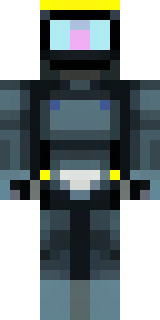
A modern scuba diver in a black wetsuit with a yellow tank
Sleek and purposeful, this underwater explorer wears a jet-black suit trimmed with neon-yellow highlights and a matching high-gloss breathing cylinder, with reflective visor panes and subtle seam textures that hint at wetsuit neoprene. Dive into oceanic builds or lead salvage and rescue missions on multiplayer servers as the pragmatic technician who maps ruins, fixes submersibles, and brokers peace between coastal bases.
Palette
#010202
#fdfa04
#0b0b0c
#445555
#191d1d
#2b3334
- Theme
- Custom
- Dimensions
- 64×64 · Java + Bedrock
- Format
- PNG (transparent)
- Model
- minecraft-skin-generator-sdxl
- Seed
- 892962082
- Added
- 3 Jul 2026