Custom · Minecraft skin
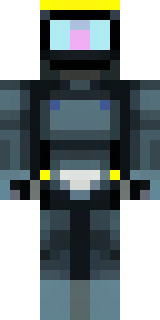
A modern scuba diver in a black wetsuit with a yellow tank
Sleek and ready for the deep, this skin pairs a matte black suit with high-contrast yellow gear, glossy visor, and subtle neoprene texture across the limbs, while straps, buckles and a compact regulator add pop and realism. Slip into the role of a professional oceanographer exploring underwater ruins or running daring salvage missions for coastal bases.
Palette
#010102
#2c3d42
#fafe95
#0d1216
#0e1419
#121d24
- Theme
- Custom
- Dimensions
- 64×64 · Java + Bedrock
- Format
- PNG (transparent)
- Model
- minecraft-skin-generator-sdxl
- Seed
- 603112264
- Added
- 2 Jul 2026