Custom · Minecraft skin
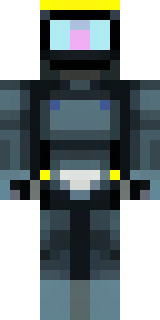
A modern scuba diver in a black wetsuit with a yellow tank
A sleek underwater explorer clad in a matte black suit with neon-yellow accents and a glossy, detailed air cylinder, featuring reflective visor pixels and subtle seam textures for a lived-in feel. Wade into coral caverns, lead salvage missions on ocean monuments or roleplay as a deep-sea researcher mapping shipwrecks and lost ruins.
Palette
#030304
#131413
#ebdcba
#fbee00
#161919
#fcfe8d
- Theme
- Custom
- Dimensions
- 64×64 · Java + Bedrock
- Format
- PNG (transparent)
- Model
- minecraft-skin-generator-sdxl
- Seed
- 1821480740
- Added
- 3 Jul 2026