Custom · Minecraft skin
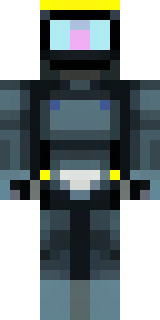
A modern scuba diver in a black wetsuit with a yellow tank
A sleek explorer in a jet-black wetsuit trimmed with deep slate panels, highlighted by a vibrant lemon-yellow cylinder strapped across the back and subtle air regulator tubing down the chest. Dive into underwater salvage runs or lead coastal rescue missions, snorkelling through shipwrecks and coral gardens while coordinating with teammates on daring, depth-chasing expeditions.
Palette
#3b3c3b
#020303
#5a5b5a
#131515
#434544
#343534
- Theme
- Custom
- Dimensions
- 64×64 · Java + Bedrock
- Format
- PNG (transparent)
- Model
- minecraft-skin-generator-sdxl
- Seed
- 203946034
- Added
- 2 Jul 2026