Custom · Minecraft skin
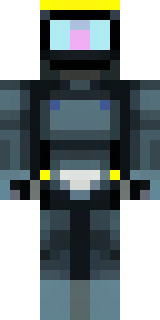
A modern scuba diver in a black wetsuit with a yellow tank
Sleek and ready for the deep, this skin pairs a matte black suit with neon-yellow kit accents and glossy visor reflections, while subtle wear marks and buckle textures add realism. Slip into coastal explorations or lead underwater salvage missions, perfect for roleplaying an experienced diver mapping reefs and hunting sunken treasure.
Palette
#131414
#010102
#323534
#3a3d3d
#232524
#363937
- Theme
- Custom
- Dimensions
- 64×64 · Java + Bedrock
- Format
- PNG (transparent)
- Model
- minecraft-skin-generator-sdxl
- Seed
- 3154612440
- Added
- 2 Jul 2026