Custom · Minecraft skin
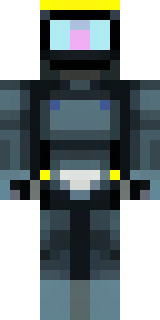
A modern scuba diver in a black wetsuit with a yellow tank
Sleek and compact, this underwater pro sports a deep-charcoal suit highlighted with cheery lemon accents and a high-contrast oxygen pack, complete with textured seams and reflective visor detailing for a lived-in explorer vibe. Slip into this kit to lead oceanic salvage runs, map coral reefs with friends, or helm submersible missions on survival servers.
Palette
#1e2324
#151a1c
#fbfb04
#323c3c
#2e3939
#2a3333
- Theme
- Custom
- Dimensions
- 64×64 · Java + Bedrock
- Format
- PNG (transparent)
- Model
- minecraft-skin-generator-sdxl
- Seed
- 2254632675
- Added
- 3 Jul 2026