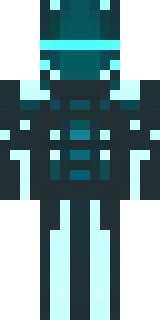
Ninja · Minecraft skin
A neon cyber-ninja in dark bodysuit with teal light trim
A shadow-slick operative clad in a close-fit black suit, laced with vivid teal luminescent trims and circuit-like patterns that pulse along the limbs and mask, punctuated by glowing eyes and matte armour plates. Slip into night raids or rooftop espionage, darting through neon-soaked cityscapes as a silent saboteur or mysterious guardian of the grid.
Palette
#252d2d
#293232
#0bfffe
#273131
#06fffc
#282e2f
- Theme
- Ninja
- Dimensions
- 64×64 · Java + Bedrock
- Format
- PNG (transparent)
- Model
- minecraft-skin-generator-sdxl
- Seed
- 4012062678
- Added
- 4 Jul 2026