Ninja · Minecraft skin
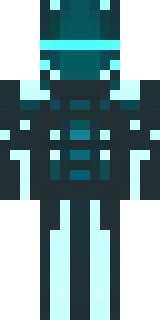
A neon cyber-ninja in dark bodysuit with teal light trim
A sleek shadow-suit hugs a lithe figure, its matte black fabric offset by sharp teal luminescent lines tracing joints, a visor with a faint glow, and segmented plating that hints at silent agility. Slip into urban stealth missions or neon-soaked multiplayer raids as a ghostly infiltrator, flitting between rooftops and server-side secrets while leaving only a trail of cyan light.
Palette
#1b221e
#54fffb
#1c2221
#5afffc
#4dfffb
#1b1d1d
- Theme
- Ninja
- Dimensions
- 64×64 · Java + Bedrock
- Format
- PNG (transparent)
- Model
- minecraft-skin-generator-sdxl
- Seed
- 2817946205
- Added
- 4 Jul 2026